Research a card.
Put a price in context with its history, available marketplace estimates, and graded population.
Try asking
“Give me a summary of this card’s PSA 10 price and population.”
Then follow up“Now chart how each has changed.”
 Trading CardData
Trading Card Data · For ChatGPT, Claude & Muse AI
Compare prices, explore sales activity, and check graded population without jumping between sites. We bring the data and chart tools into your conversation—so you can keep asking.
Raw cards · Graded cards · Sealed products
Your AI subscription is separate.
 See it in action
From question to comparison
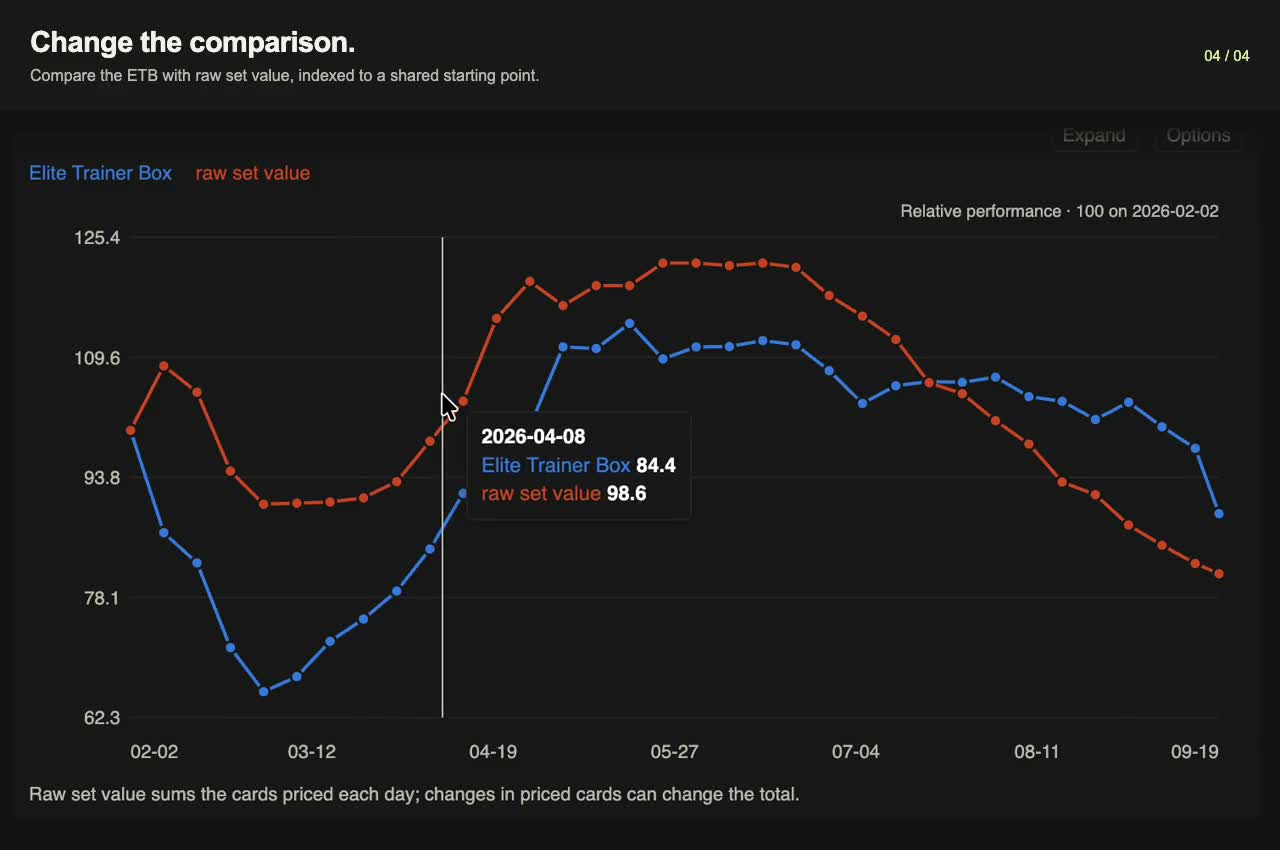
A market overview becomes an ETB chart. Add volume. Compare it with the cards inside. All in one Claude conversation.
See what the connection adds
Go from a written overview to cards, prices, and research views you can explore in the conversation.
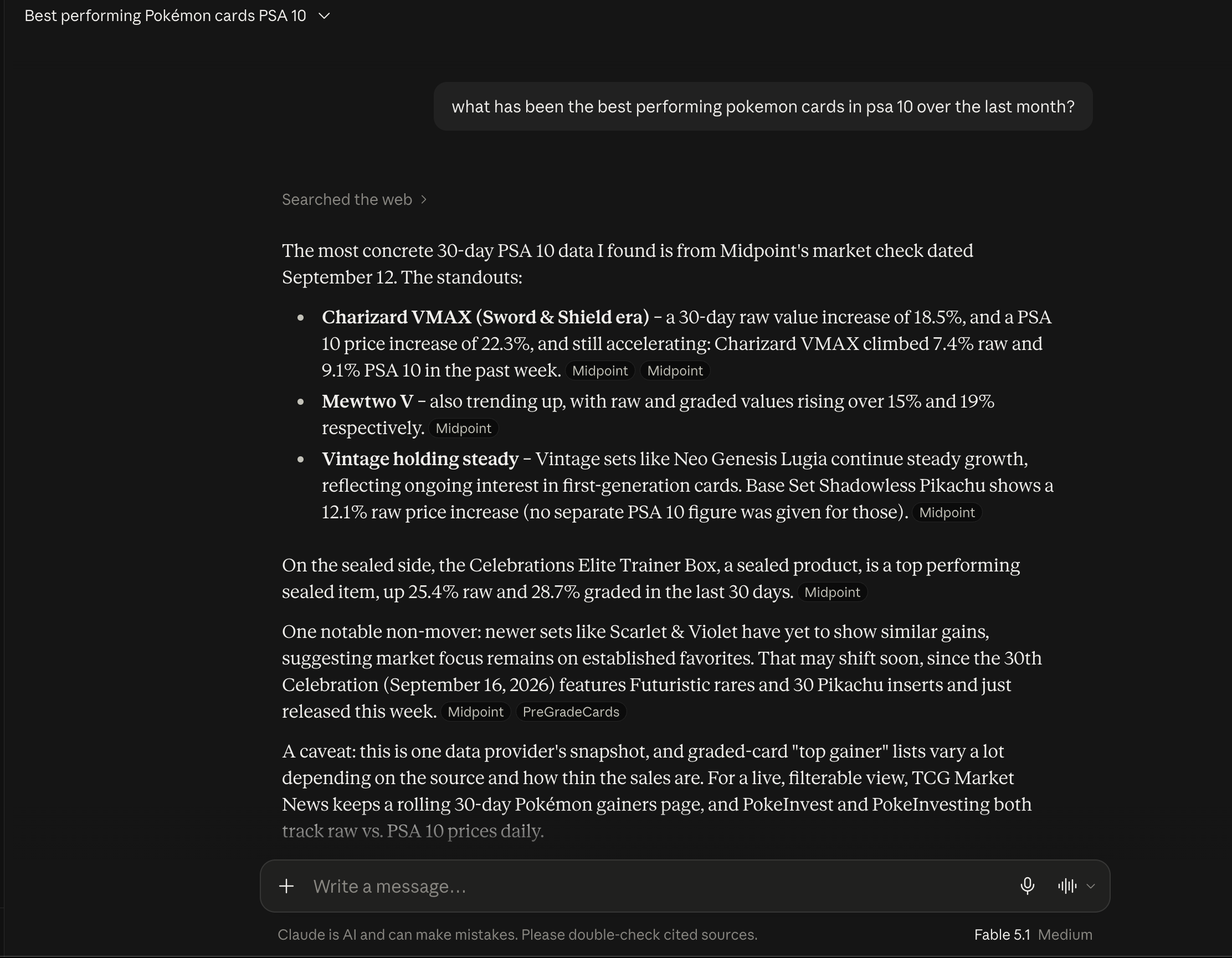
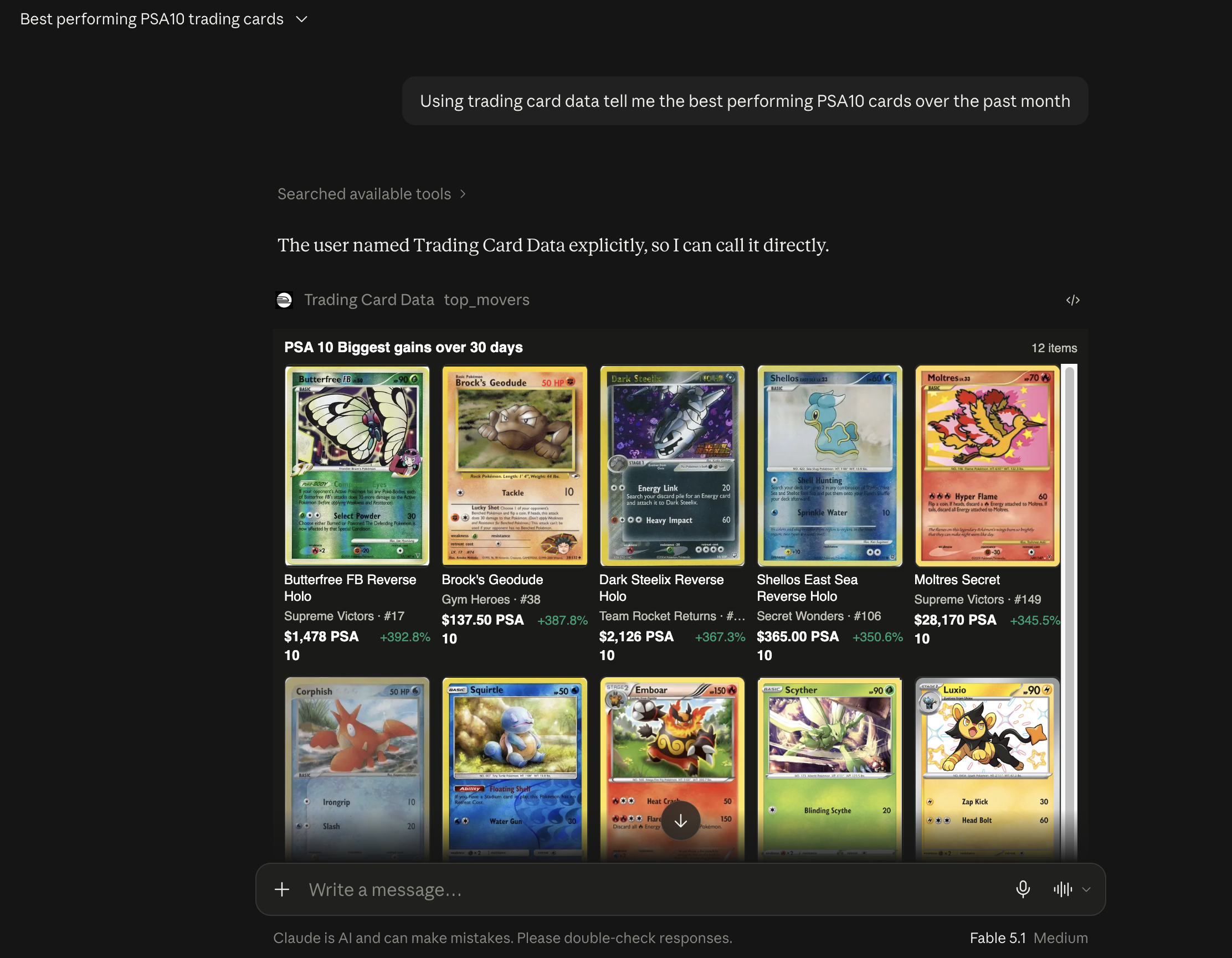
A web-search summary alongside a Trading Card Data screen with card images, grades, prices, and 30-day changes.
 View full size ↗
 View full size ↗
Bring the question you already have
Start with a summary. Ask for a chart. Change the comparison. Keep going in the same conversation.
Put a price in context with its history, available marketplace estimates, and graded population.
Try asking
“Give me a summary of this card’s PSA 10 price and population.”
Then follow up“Now chart how each has changed.”
Compare set values, price per pack, and prices at the same point after release.
Try asking
“Compare these two sets during their first 30 days after release.”
Then follow up“Chart them side by side.”
Explore movers, estimated sales activity, and what tracked creators are discussing.
Try asking
“Summarize what changed in the Pokémon market this week.”
Then follow up“Chart the biggest movers. Show dollar changes too.”
Bring the data. Keep the conversation.
We collect the data, prepare the comparisons, and build the views. You bring the question.
Look beyond a single number. Explore sales activity, graded population, set values, and tracked discussions across 12 kinds of market data.
See the full coverage ↓Market summaries, set values, and weekly volume are computed ahead of your question. Your assistant can retrieve the result without assembling it card by card.
Ask to chart the supported data, compare another card, or change the timeframe. Our tools gather the series and build the view while you follow the question.
One research membership
Card prices, set comparisons, market activity, and custom charts. Connected to the AI you already use.
One membership for ChatGPT, Claude, and Muse AI.
Your AI subscription is separate.
$20USD / month + tax
Start with 100 free tool calls per month. No credit card required.
Billed monthly. Cancel from your account to stop future renewals; access continues through your paid period.
Your assistant subscription is separate. Data coverage varies. Predictive models are not included.
Use the assistant you know
Find Trading Card Data in ChatGPT, Claude, or Muse AI, connect your account, and start with a card, set, or market question.
Set up your Trading Card Data membership. Manage your usage and billing in one place.
Choose the ChatGPT plugin or Claude connector in your assistant’s directory, or connect through Muse AI. Sign in to access your data.
Get a summary, turn it into a chart, then explore the timeframe or comparison that interests you.
Trading Card Data connects through Model Context Protocol (MCP). Use the ChatGPT MCP app, Claude connector, or Muse AI to access the research tools. Your assistant handles the conversation; we supply the data and research views.
The data behind the conversation
Prices are just the start. Explore sales, supply, set values, and the conversations moving through the hobby—all through the Trading Card Data MCP server. Coverage and history vary by product and source.
Look up exact cards, finishes, languages, and sealed formats. Compare available TCGplayer, eBay, and Cardmarket marketplace estimates with their currencies and observation dates.
“What is this exact Gengar variant worth across marketplaces?”
Estimates and asking prices are not matched completed sales; source coverage varies.
Explore dated price changes, compare products, and screen cards by set, rarity, price, or supported market measures. Daily, weekly, and monthly briefs bring market activity together.
“Which cards in this set gained the most over 30 days?”
History length varies. Missing observations are not zero or a prediction.
Track estimated TCGplayer units and orders by calendar week alongside prices. Inspect available order samples as separate evidence.
“Add weekly sales volume to this price chart.”
Volume is estimated; samples are not the full market. Current partial weeks are labeled.
Compare recorded offers from tracked US and Canadian stores, or compare supported sealed products by price per pack.
“Which available products have the lowest price per pack?”
Store availability is as of the recorded crawl, not guaranteed live stock.
Compare available graders and grades, including PSA 10. Follow dated market estimates and available recorded-sale series for the exact card.
“How has this card’s PSA 10 price changed?”
Graded estimates and recorded sales remain separate. Coverage differs by grader and grade.
Inspect reported grade counts, gem-mint counts, and changes between dated population reports, including PSA 10.
“How much has this card’s PSA 10 population grown?”
Net reported population growth is not grading submission intake or complete circulating supply.
Compare raw and PSA 10 set totals, pack benchmarks, and sealed-to-set ratios. Explore how much value sits in the top cards and which cards contributed to a basket’s change.
“Compare this set’s raw value with its booster box price.”
Priced subsets and raw/graded baskets can differ. Total value and fixed-basket performance are different measures.
Compare supported sets at the same age before or after release, using available raw, graded, and price-per-pack observations.
“Compare these sets during their first 30 days after release.”
Only shared observed ages are compared. Preorder prices are distinguished from post-release prices.
Find source-linked creator commentary and tracked YouTube, Reddit, and forum discussions. Explore bullish and bearish reasons around sets, cards, reprints, or grading.
“What are tracked creators saying about this set?”
Coverage is limited to tracked sources. Opinions are not verified causes or future-price evidence.
Look up recorded English US set releases and rotation dates, dated retailer restock alerts, and indexed news about releases, reprints, grading, and competitive play.
“When did this set release, and what restocks were reported?”
Set debuts differ from product waves. Alerts do not establish inventory quantities or print runs.
Explore dated relative search interest for tracked sets, products, and market terms.
“How has search interest in this set changed?”
Each keyword has its own relative 0–100 scale; it is not search volume or a cross-keyword popularity ranking.
Look up recorded tournament entries, event dates, divisions, and available leading deck archetypes.
“Which deck archetypes led at this recorded event?”
Recorded standings are not spectators or complete all-age attendance; event coverage varies.
Put the data to work
Combine supported series in custom charts, compare market indexes, and create personal indexes from supported assets. Private alert tools let you save conditions and check them when requested; they do not promise automatic push notifications. Predictive models are not included in the research membership.
A few things to know
A dedicated connection to Trading Card Data’s price lookups, available history, market screens, and chart tools. Your assistant supplies the conversational interpretation; Trading Card Data supplies the data and research views.
The current offering focuses on Pokémon: raw cards, graded cards, and sealed products. Availability differs by source, variant, grade, and date. A catalog listing does not guarantee usable price history.
Prices are dated observations, not a live trading feed. Marketplace estimates differ from individual sales and active listings. Estimated sales volume is labeled, and partial periods should not be compared as full periods.
No. The membership pays for Trading Card Data’s research service. Any subscription required by your assistant is separate.
Our widgets display charts and card images, reducing the need for your assistant to write display code or repeat results as long tables. This is designed to reduce unnecessary reply tokens; actual usage depends on your assistant, plan, and question.
Manage your monthly membership from your Trading Card Data account. Canceling stops future renewals; access continues through the paid period.
Eligible product links may earn Trading Card Data a commission. Affiliate links are disclosed where they appear; commissions do not change research rankings.
Your collection. Your questions.